Unit 6 - Normalizing data. Named entity recognition
We have by now learned the basics of working with python and with python data types. We have also learned to process files. We are moving to doing more interesting things with textual data. In this lesson, we will learn about cleaning and normalizing data and how to identify named entities.
We will continue to use NLTK, but we will also install another powerful Natural Language Processing package, spaCy. If you haven’t, go to the spacy_install.ipynb notebook and follow instructions there. Then come back here to import and use spaCy.
# optional: pandas for storing information into a dataframe
import pandas as pd

# we need to import NLTK every time we want to use it
import nltk

# import the NLTK packages we know we need
from nltk.tokenize import word_tokenize
from nltk.stem import PorterStemmer
from nltk.stem import WordNetLemmatizer

# these 2 packages may already be in your system, but just in case
nltk.download('punkt')
nltk.download('wordnet')

# import spaCy and the small English language model
import spacy
nlp = spacy.load("en_core_web_sm")

# this does prettier displays on spaCy
from spacy import displacy
Normalizing data
Normalizing refers to a set of processes to make data uniform. This is generally useful to count things the correct way and to get to the essence of the words in a text. Think of counting the instances of the word “the” in a text. You’ll want to make sure that “the”, “The”, and “the?” all look the same before you count them. Normalization includes:
Converting all words to lowercase
Removing or separating punctuation
Stemming - removing endings and ending up with the stem (endings -> end; went -> went)
Lemmatizing - removing endings and ending up with the root (endings -> end; went -> go)
Most NLP packages (NLTK, spaCy) have built-in methods to do this. But it’s also good to know how to do it yourself, in case you want to control what the output looks like.
# an excerpt from The Peak, https://the-peak.ca/2025/01/sfu-study-calls-for-utility-scale-solar-power-systems-in-canada/
text1 = "In December 2024, Clean Energy Research Group (CERG) published a paper calling for Canada to build “mass utility-scale solar mega projects,” according to an SFU news release. Utility-scale solar “refers to large solar installations designed to feed power directly onto the electric grid.” An electric grid is an “intricate system” that provides electricity “all the way from its generation to the customers that use it for their daily needs.”"
# a made-up text
text2 = "This gotta be the wéïrdest bit of text that's ne'er gonna be The thing you'll encounter, but I have to give, gave, given, something!\r, even the weirdest. Just tryna throw everything into a made-up bit that isn't making any sense.<br> And here's a sentence with the irregular plural feet and one with the irregular plural geese."Tokenizing without lowercase
We will use NLTK to tokenize the texts. You can print the list of tokens, and also print the count of types and tokens. You’ll see that ‘And’ and ‘and’ count as two different types. But they are really the same word. That’s why we lowercase first or lowercase after tokenizing, but before counting. Compare this bit of code and the output to what happens if we lowercase.
tokens1 = nltk.word_tokenize(text1)
n_tokens1 = len(tokens1)
n_types1 = len(set(tokens1))tokens1for t in set(tokens1):
print(t)print(n_tokens1)
print(n_types1)# same, but for text2
tokens2 = nltk.word_tokenize(text2)
n_tokens2 = len(tokens2)
n_types2 = len(set(tokens2))tokens2for t in set(tokens2):
print(t)print(n_tokens2)
print(n_types2)Tokenizing after lowercasing
Compare the numbers and the output now.
# just using the lower() method in a string
tokens1_lower = [w.lower() for w in tokens1]tokens1_lowern_types1_lower = len(set(tokens1_lower))print(n_tokens1)
print(n_types1)
print(n_types1_lower)# same for text 2
tokens2_lower = [w.lower() for w in tokens2]tokens2_lowern_types2_lower = len(set(tokens2_lower))print(n_tokens2)
print(n_types2)
print(n_types2_lower)Stemming and lemmatizing with NLTK
Stemming
Stemmers remove any endings that may be inflectional suffixes in English. There are different versions of stemmers, even within NLTK. See the overview of stemming in NLTK. Here, we’ll use the Porter Stemmer, developed by Martin Porter.
Look at the output carefully and note where things don’t seem to make sense. This is because Porter removes anything that may possibly be an ending, including the ‘-er’ in ‘December’, because it is sometimes an inflectional ending in words like ‘clever’.
Lemmatization
Lemmatizers are a bit smarter about inflection and are able to identify roots, even when no suffixes are involved (gave -> give; feet -> foot). We’ll use the WordNet lemmatizer in NLTK.
# assign the stemmer to a variable, 'stemmer'
stemmer = PorterStemmer()

# go through the list of tokens (tokens1)
# lower the tokens in that list
# use list comprehension (with the square brackets)
 # so that the stemmer can iterate over the list
tokens1_st = [stemmer.stem(token.lower()) for token in tokens1]
tokens2_st = [stemmer.stem(token.lower()) for token in tokens2]tokens1_sttokens1tokens2_sttokens1# assign the lemmatizer to a variable
lemmatizer = WordNetLemmatizer()
# go through the list of tokens and lemmatize
tokens1_lm = [lemmatizer.lemmatize(token.lower()) for token in tokens1]
tokens2_lm = [lemmatizer.lemmatize(token.lower()) for token in tokens2]tokens1_lmtokens2_lmOther options: remove non-ASCII characters, remove HTML tags
There are additional things you may want to do to clean and normalize text, including converting everything to ASCII (wéïrdest -> weirdest) and removing HTML tags (‘<br>’, -> ‘’ ). You’ll probably want to do that before tokenization, so that the angle brackets in HTML don’t get tokenized as punctuation.
The emoji library can also convert UTF emoji into descriptions (🤗 -> ‘hugging face’)
Normalizing text with spaCy
Now that you have seen how to do this with NLTK, the good news is that spaCy will do pretty much everything you need to do to clean and normalize text. It will also give you morphological and syntactic information about it. Go to the spacy_install.ipynb notebook for more information on how spaCy works.
We call spaCy by using the nlp object and passing it the text that we want to process. Then we can query and print the information contained in the doc object that spaCy creates.
text1text2# process the text with spaCy
doc1 = nlp(text1)
doc2 = nlp(text2)# print the 'text' attribute of each of the tokens
for token in doc1:
print(token.text)# if you want to see this in a single line, you can join the strings in the list, with a space between each
print(" ".join([token.text for token in doc1]))
print("\r") # this is just so that the two texts are separated on the screen by an empty line
print(" ".join([token.text for token in doc2]))# print the lemmas
print(" ".join([token.lemma_ for token in doc1]))
print("\r")
print(" ".join([token.lemma_ for token in doc2]))# print the part of speech of each word after the word
print(" ".join([f"{token.text}/{token.pos_}" for token in doc1]))
print("\r")
print(" ".join([f"{token.text}/{token.pos_}" for token in doc2]))# the doc object in spaCy contains all kinds of information
# including rich morphology for each word
for token in doc1:
print(token.text, "\t\t", token.lemma_, "\t\t", token.pos_, "\t\t", token.morph) # the \t helps show sort of columns# if you don't know what the abbreviations mean,
# you can ask for an explanation
spacy.explain("ADP")# doc also includes syntactic information about heads and dependents
# including rich morphology for each word
for token in doc1:
print(token.text, "\t\t", token.pos_, "\t\t", token.dep_, "\t\t", token.head)# btw, you can still count tokens and types with spaCy
tokens1 = [token.text for token in doc1]
types1 = set(tokens1)
# you can see those lists
print("tokens: ", tokens1)
print("\r")
print("types: ", types1)
# and you can print their length
print("\r")
print("number of tokens: ", len(tokens1))
print("number of types: ", len(types1))Using pandas to show the output
You can also store the information into a pandas dataframe, which makes it much more readable and easy to save.
data1 = []

for token in doc1:
    data1.append([token.text, token.pos_, token.dep_, token.head])

df = pd.DataFrame(data1)
df.columns = ['Text', 'Tag', 'Dependency', 'Head']

df
Named Entity Recognition
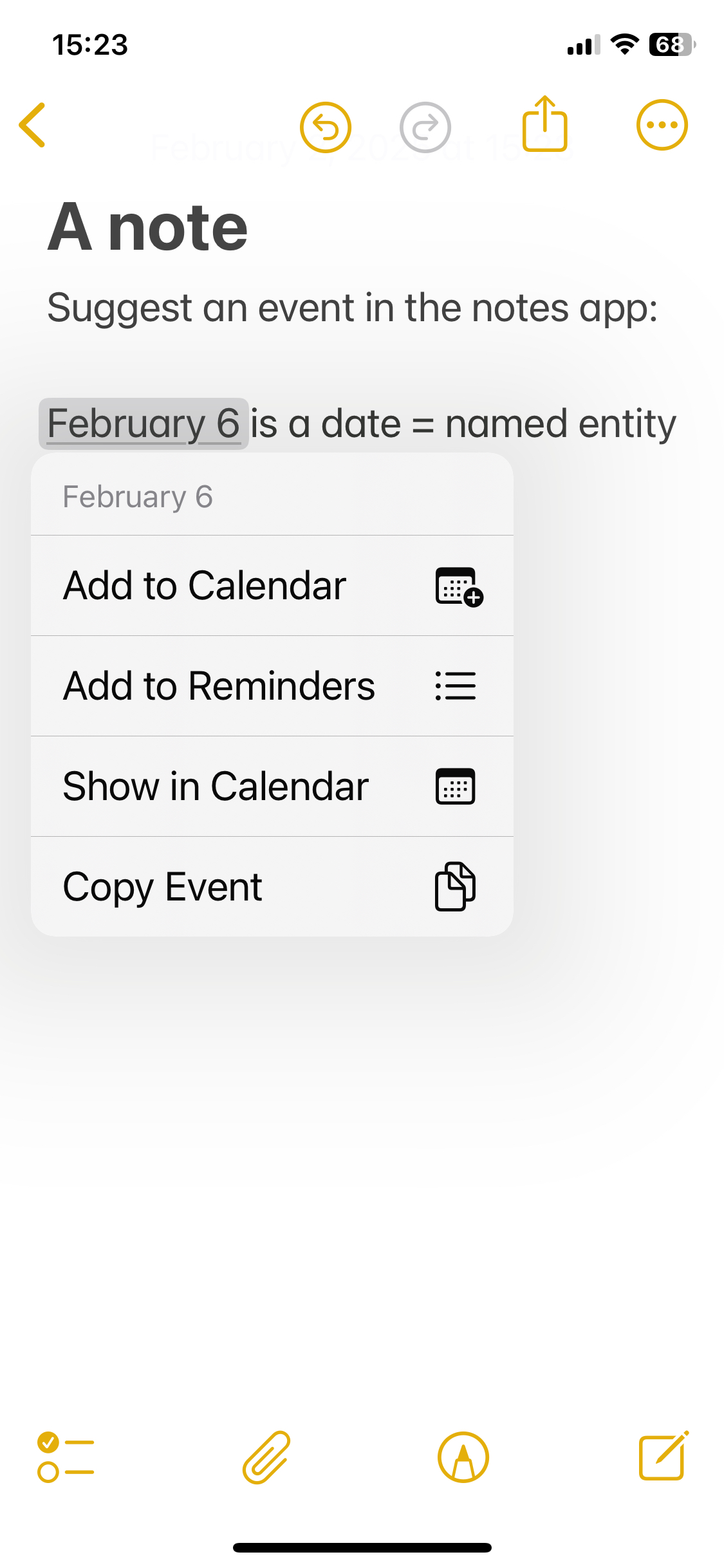
Named Entity Recognition (NER) is the process of identifying and labelling named entities, that is, real world objects, locations, and identifiers such as dates, currency, or quantities. It is very useful if you want to know, for instance, who is mentioned in a text, which countries are involved, or which dates. It is what allows your email or messaging application to identify dates and suggest a calendar entry, as in the image below, from the iPhone Notes app.
spaCy has a pretty powerful NER module. It can give you the named entities in a text, with the label for each word that is part of the entity. It also knows the boundaries of the entire entity. So it knows that “Clean”, “Energy”, “Research”, and “Group” all have the ORG (for organization) label, but it also knows that the full entity is “Clean Energy Research Group”.
You can list all the entities in a text with the usual for loop. Using the displacy module, you can also visualize the boundaries and the types in different colours.
# print each token and its entity label, if it has one
for ent in doc1.ents:
    print(ent.text, ent.label_)
# same for doc2, but it doesn't contain entities
for ent in doc2.ents:
print(ent.text, ent.label_)# it's useful to count and store the named entities in a text
# create an empty list
named_ents1 = []
# go through the entities and append each to the list
for ent in doc1.ents:
named_ents1.append((ent.text, ent.label_))
print(named_ents1)# create a df for the entities, from the list above
df_ents1 = pd.DataFrame(named_ents1)
# name the columns
df_ents1.columns = ['Entity', 'Label']
# print
df_ents1# visualize the entities
displacy.render(doc1, style="ent")Summary
We have learned quite a bit! Text normalization includes:
Lowercasing the words
Tokenizing (identifying words, punctuation, anything else)
Stemming
Lemmatizing
And we have learned to do this with both NLTK and spaCy.
We have also learned about Named Entity Recognition and how to extract entities with spaCy.